
Introduction: Precision Meets Privacy in PDF Merging
When merging PDF documents, the common frustrations often revolve around lack of control and privacy risks. Typical PDF merging tools stitch together entire files without regard for individual page relevance or order. Users can rarely choose specific pages or define how pages interweave, causing manual, time-consuming editing afterward. Additionally, many online tools require users to upload documents to servers, raising significant privacy concerns for sensitive information.
DocMiral challenges this status quo by introducing a next-generation PDF merging workspace engineered for precision and control. Rather than a basic merge button, it offers page-level editing, programmable selection rules, and complete privacy through fully client-side processing.
What Makes This Tool Different
This is not your typical “drag and merge” PDF tool. Instead, DocMiral provides granular, page-level control to assemble PDFs exactly as needed. Each page is treated as an individual element to build your final output document with meticulous care. This nuanced approach moves beyond simple concatenation to a logic-driven editorial workflow.
Step-by-Step Workflow for Precise PDF Merging
Step 1: Load Multiple PDFs
Begin by dragging and dropping or selecting multiple PDF files simultaneously with the file picker. This multi-file input forms the foundation for your page-by-page manipulation.
Step 2: Explore Pages Visually
All loaded PDFs are rendered as thumbnail grids, providing a clear visual workspace. This “working canvas” instantly conveys page order and content, making it straightforward to browse and select exactly what you need.
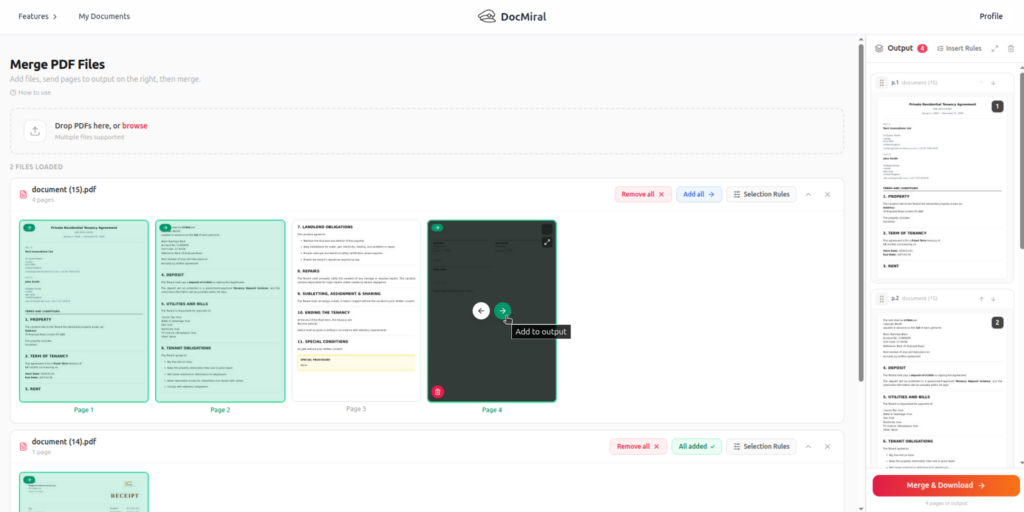
Step 3: Select Pages with Precision Using Selection Rules
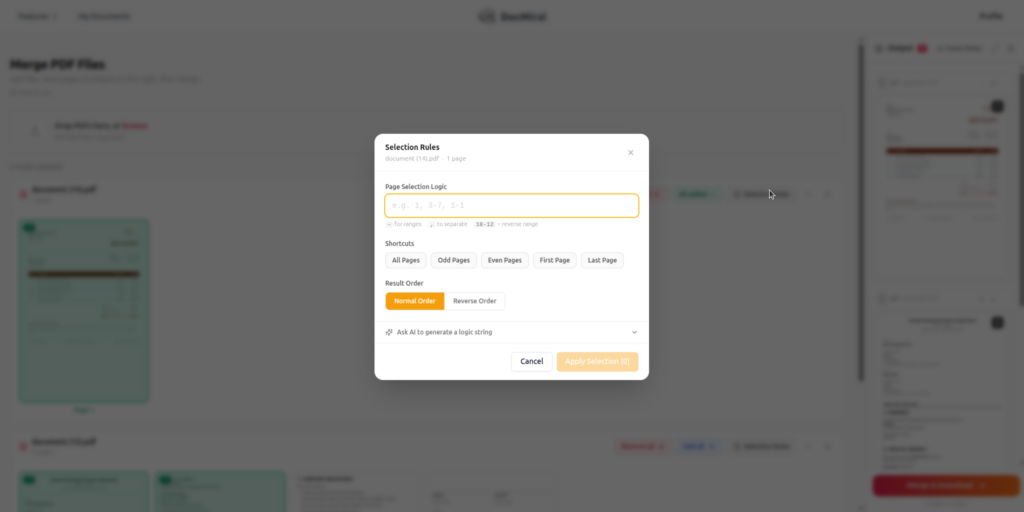
The core innovation lies in Selection Rules, a succinct logic syntax to specify pages:
1– select a single page3-7– select pages in ascending range18-12– select pages in reverse order1,3-7,20– combined individual pages and ranges
Built-in shortcuts like odd, even, first, last, and all streamline common scenarios.
For those unfamiliar with logic strings, an AI-powered “Ask AI” helper converts plain English instructions into the required format, reducing the learning curve.
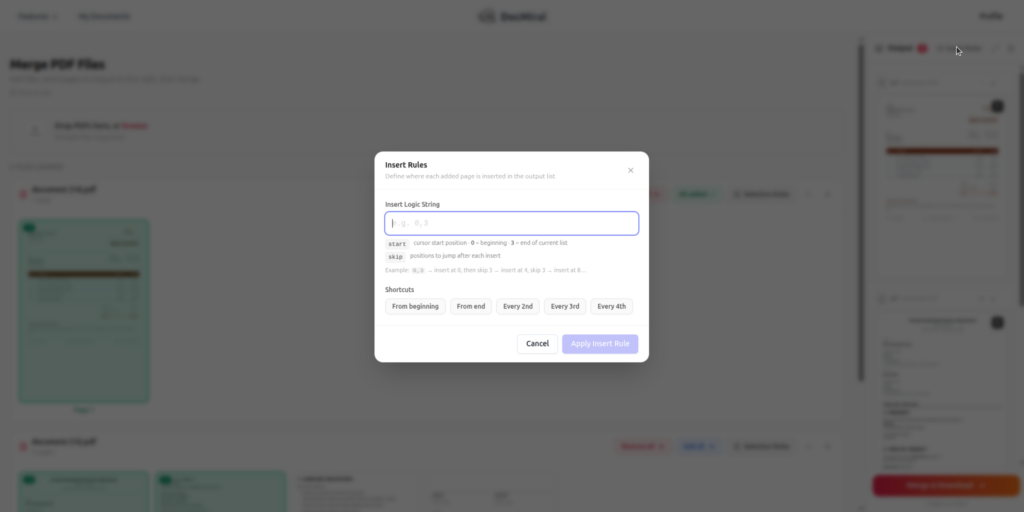
Step 4: Control Placement with Insert Rules
This unique feature allows programmable insertion patterns via concise logic like start,skip (e.g., 0,3), indicating insert at position 0, then every fourth slot thereafter. This enables complex workflows such as:
- Interleaving pages from two PDFs
- Combining duplex-scanned pages into proper order
- Structured multi-source document assembly
Most PDF tools lack this capability, but it is critical to precise page order manipulation.
Step 5: Preview Before Finalizing
Users can inspect a high-resolution preview in fullscreen mode to verify page order and content before merging, reducing errors.
Step 6: Build the Final Output
After selection and insertion rules are configured, pages can be reordered manually via drag and cursor placement on the canvas. This hands-on adjustment assures total control over the final document’s structure.
Step 7: Export
Once satisfied, export your new PDF as a single file. DocMiral names it with a timestamp and suffix, for example, merged-20240614-1432-by-docmiral.pdf, providing clear provenance.
Privacy and Architecture: Security You Can Trust
DocMiral processes all PDFs entirely within your browser. No files are uploaded to any server or cloud. This client-side architecture means your documents never leave your device, addressing privacy concerns that plague traditional online PDF tools.
How DocMiral Outperforms Typical PDF Merge Tools
Where most tools merge entire files with zero custom logic, DocMiral:
- Allows page-level merging, not just at the file level
- Enables programmable selection with a clear logic syntax
- Supports insert rules for intricate page interleaving
- Integrates AI to simplify complex selection tasks
- Guarantees privacy with fully in-browser processing
Real Use Cases
- Extracting Specific Sections from long reports for targeted distribution
- Merging Only Even or Odd Pages from scanned documents to reconstruct originals
- Interleaving Two PDFs to combine front and back duplex scans or related documents
- Rebuilding Structured Documents from modular PDF sources without tedious manual editing
Conclusion
DocMiral’s free PDF merger is a precision workspace designed for real editing control. It combines page-level flexibility, programmable workflows, and robust privacy safeguards. If you need to work precisely with PDFs and protect your data, merging documents page-by-page is now practical and secure.
Try it yourself: https://docmiral.com/apps/merge-pdf/how-to-use