Category: Apps

  • How to Generate CIS-Compliant Invoices Automatically in 2026 (UK Guide)

    Understanding CIS Compliance and E-Invoicing in the UK for 2026

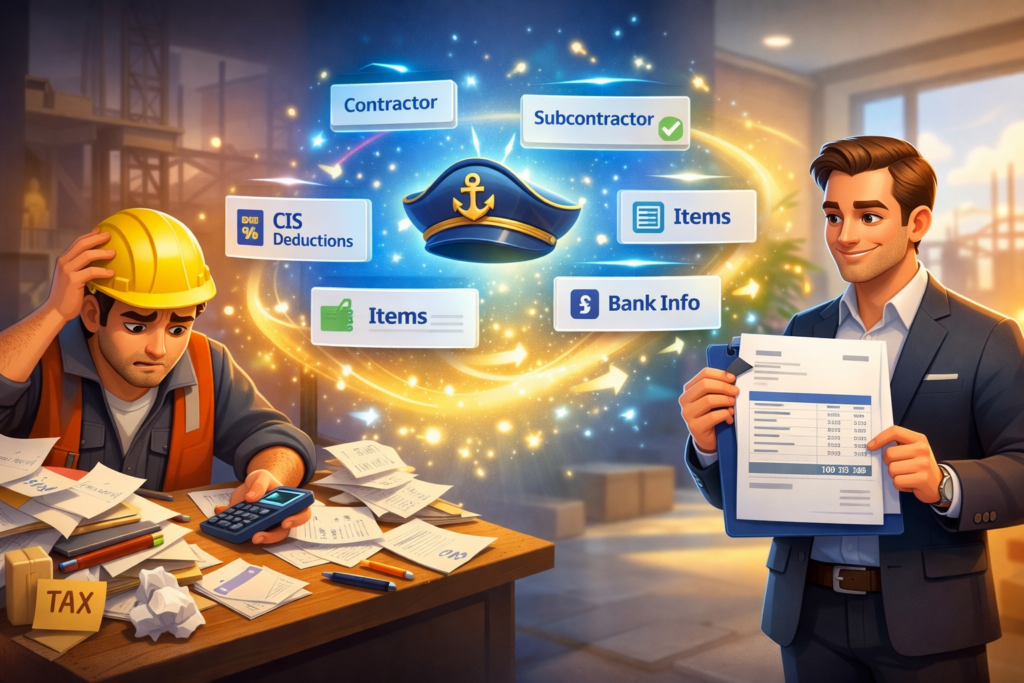
    The Construction Industry Scheme (CIS) governs tax deductions for construction contractors and subcontractors in the UK. Staying compliant with CIS invoicing rules is critical for construction businesses to avoid penalties and ensure smooth payment processes. As 2026 approaches, the UK is gearing up for a significant pivot year in e-invoicing practices, setting the stage for a full mandate by 2029.

    One of the driving forces behind this change is the expansion of PEPPOL (Pan-European Public Procurement OnLine), an international e-procurement network facilitating standardized invoice exchange. Adoption of PEPPOL e-invoicing protocols will ensure CIS invoices meet government requirements and simplify cross-system interoperability.

    Challenges of Manual CIS Invoicing

    Manual generation of CIS-compliant invoices can be cumbersome. Contractors and subcontractors must include specific details such as tax deduction amounts, contractor and subcontractor information, and bank details while accurately calculating payment amounts post deductions. Errors or omissions can lead to rejected invoices or penalties.

    Repeatedly entering client data and maintaining accurate records also slows down invoicing efficiency, leading to delayed payments and cash flow challenges.

    Introducing DocMiral’s Free CIS-Compliant Invoice Generator for 2026

    To address these challenges, DocMiral offers a free, no-account-required CIS invoice generation App specifically designed for UK construction businesses preparing for 2026 and beyond.

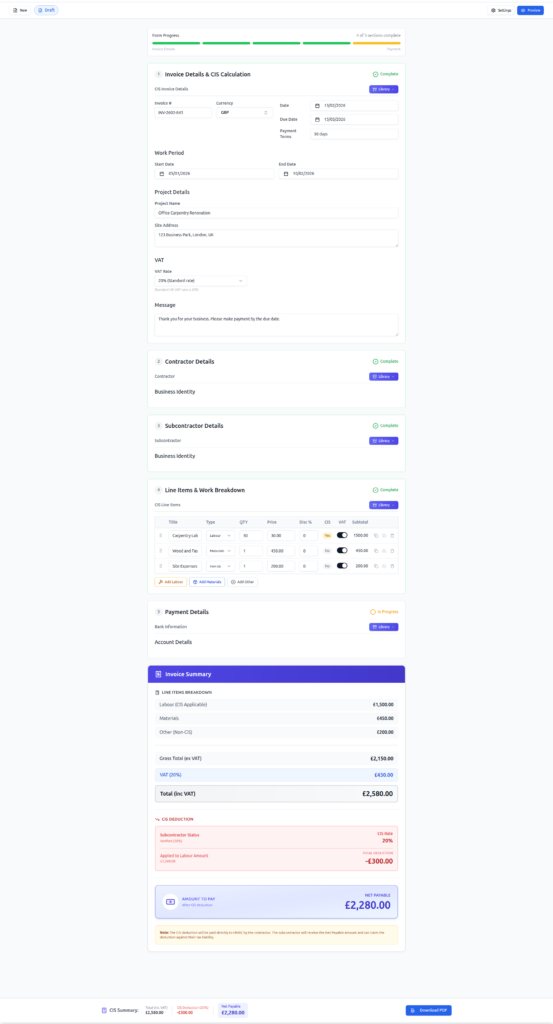
    This tool leverages DocMiral’s MiniApps platform, providing a structured input experience through dedicated forms for contractors, subcontractors, businesses, customers, CIS-specific products, and bank information.
    How It Works: Step-by-Step Guided Input

    • Step 1: Enter contractor and subcontractor details using MiniApps forms that enforce required CIS fields.
    • Step 2: Add business and customer information through predefined fields ensuring compliance with UK tax authority requirements.
    • Step 3: Select CIS-specific product codes and input work details to accurately specify the nature of construction services.
    • Step 4: Fill bank information to facilitate payment details inclusion on the invoice.
    • Step 5: The app automatically calculates payment amounts, tax deductions, and totals based on the inputs provided.

    Data entered can be saved in reusable Buckets, allowing repeat clients’ information to be quickly loaded in future invoices, saving time and improving accuracy.

    Verification with TARS AI Chat Assistance

    Once your invoice draft is complete, leverage DocMiral’s integrated TARS AI chatbot for live verification. TARS reviews your invoice data, flags any compliance or calculation issues, and suggests corrections before finalizing. You can open your document from documents list to access Tars.

    Exporting and Using Your CIS-Compliant Invoice

    After completing and verifying your invoice, export it as a professionally formatted PDF ready for delivery to clients, upload to accounting software, or submission via PEPPOL networks.

    Why Automate CIS Invoice Generation in 2026?

    • Prepare for the 2029 mandatory e-invoicing standards early.
    • Reduce errors and avoid costly penalties.
    • Save time with reusable data Buckets and guided inputs.
    • Ensure compliance with the latest CIS rules effortlessly.
    • Improve cash flow with faster, trustworthy invoicing.

    Try DocMiral’s Free CIS Invoice Generator Today

    No registration or account is needed to get started. Visit DocMiral’s CIS Invoice Generator now and experience seamless CIS-compliant invoice automation designed for UK construction businesses in 2026.

  • Build Your Own AI Resume Generator: Templates + CV Parsing in 2026

    Resumes in 2026 are no longer just documents. They are structured data pipelines.

    Recruiters, ATS systems, and AI screening tools expect resumes that are clean, semantic, and machine-readable. If your CV is not structured properly, it does not matter how good your experience is, it simply gets filtered out.

    This is where AI-powered resume generation changes everything. Instead of manually rewriting your CV, you can now upload your existing document, let AI parse it, and generate a fully optimized version instantly.

    What Changed in Resume Standards in 2026?

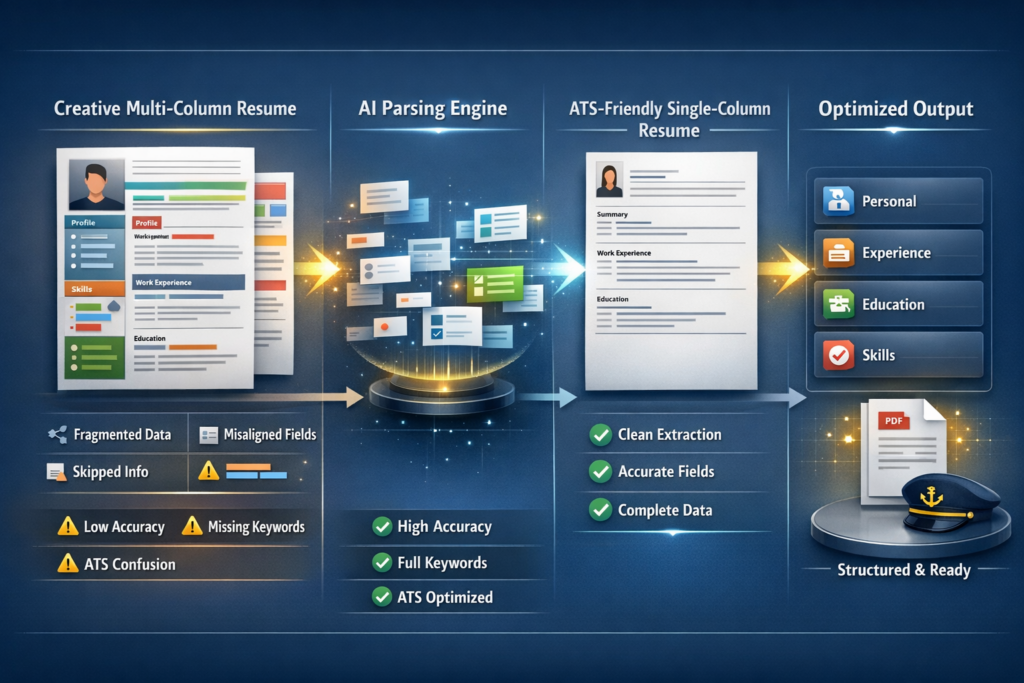
    Resume expectations have evolved significantly. The old approach of creative layouts and multi-column designs is no longer effective.

    Modern systems prioritize clarity, structure, and semantic meaning.

    1. Skills-First Formatting

    Recruiters and AI systems now scan for skills before anything else. Your resume needs to clearly expose capabilities in a structured way.

    2. Semantic Keyword Matching

    ATS systems no longer rely on exact keywords. They understand context. That means your resume needs to be structured, not just filled with buzzwords.

    3. ATS 2.0 Parsing Challenges

    Modern parsers extract meaning from sections like experience, education, and skills. Poor formatting breaks this extraction.

    4. Single-Column Still Wins

    Despite all design trends, single-column layouts remain the most reliable format for ATS compatibility.

    The New Workflow: From CV Upload to Optimized Resume

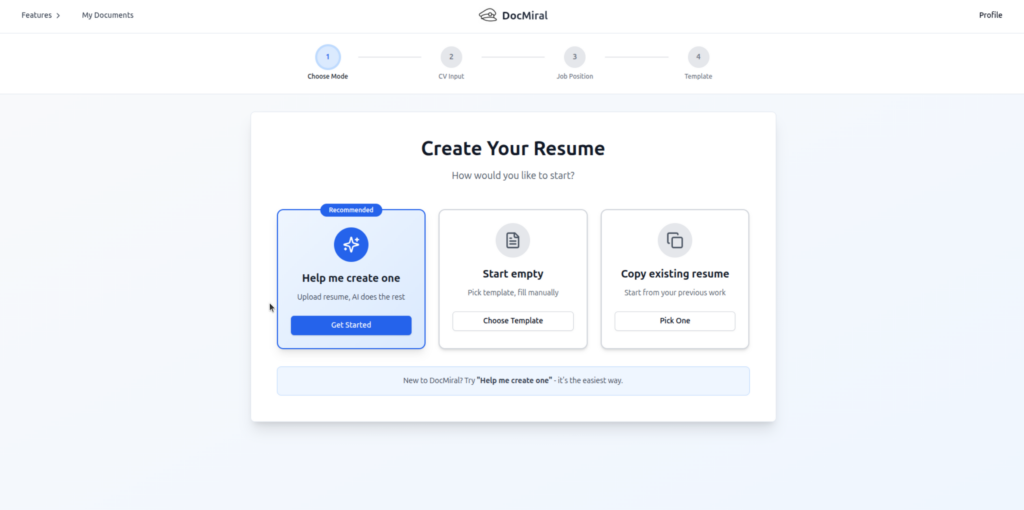
    Instead of rewriting your resume manually, the modern workflow looks like this:

    • Upload your existing CV as a PDF
    • AI extracts structured data from it
    • Data is mapped into predefined sections
    • A clean template is auto-filled
    • You refine it using AI or manual edits
    • Export as a polished PDF

    This is not just convenience. It is a shift from document editing to data-driven generation.

    How CV Parsing Works Under the Hood

    When you upload a CV, AI systems like TARS analyze the document and extract structured information.

    In DocMiral, this maps directly into MiniApps.

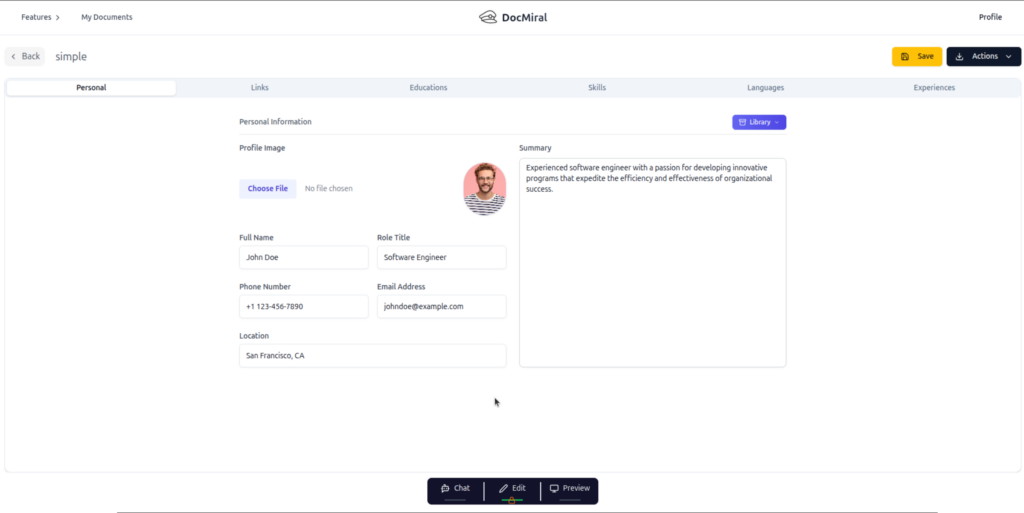
    MiniApps are predefined structured sections such as:

    • Personal information
    • Work experiences
    • Education
    • Skills
    • Projects and certificates

    This structure is critical because templates rely on predictable data formats to generate consistent output

    Step-by-Step: Build Your AI Resume Generator

    Step 1: Open the Free ATS Resume App

    Start with the built-in tool at /apps/resumes.

    This app allows you to upload your existing CV and immediately generate a new one without creating an account.

    Step 2: Upload Your Old CV

    Upload your PDF resume. The system extracts content including job history, education, and skills.

    The parsing endpoint converts your CV into structured JSON aligned with resume MiniApps.

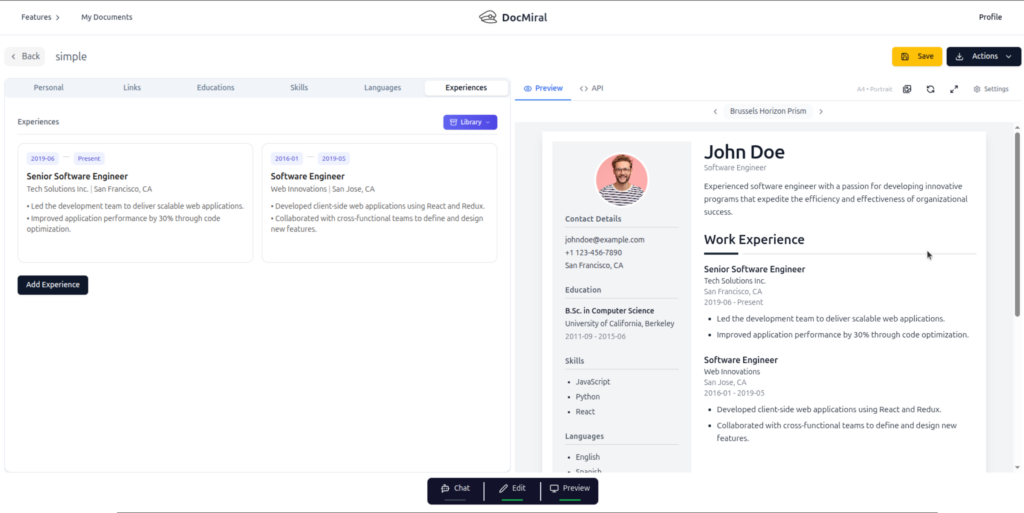
    Step 3: Auto-Populate a Modern Template

    Once parsed, the data is injected into a clean, ATS-friendly template.

    This includes:

    • Single-column layout
    • Clear section hierarchy
    • Structured bullet points
    • Optimized spacing for readability

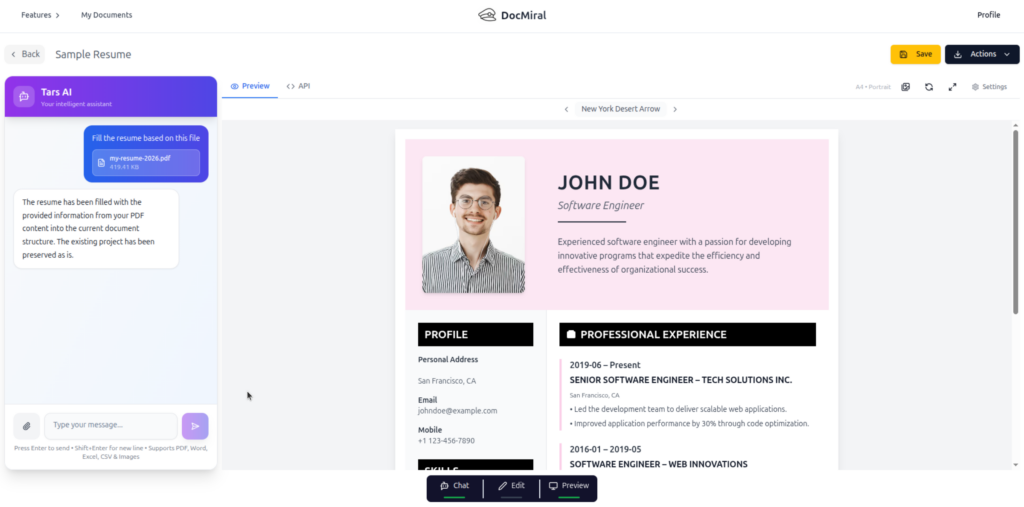
    Step 4: Refine Using TARS AI

    You can now chat with TARS directly inside the document builder.

    Examples:

    • “Improve my experience descriptions”
    • “Add more impact to my bullet points”
    • “Tailor this resume for a backend engineering role”

    TARS updates only the relevant sections without breaking the structure.

    Step 5: Live Preview and Adjust

    The live preview ensures that every change is reflected instantly.

    You can tweak spacing, sections, or content without losing structure.

    Step 6: Export Your Resume

    Finally, export your resume as a PDF.

    The output is clean, consistent, and optimized for both humans and machines.

    Why This Beats Manual Resume Builders

    Traditional resume builders treat resumes like forms. This approach treats them like systems.

    • No repetitive data entry
    • No formatting guesswork
    • No broken layouts
    • No rewriting from scratch

    Instead, you work with structured data that can be reused, refined, and regenerated.

    Reuse Your Data with Buckets

    One of the biggest advantages is reusability.

    Once your resume data is structured, you can store it in Buckets.

    This allows you to:

    • Reuse experience across multiple resumes
    • Generate role-specific versions instantly
    • Maintain consistency across documents

    This turns your resume into a living data source, not a static file.

    Final Thoughts

    Building an AI resume generator in 2026 is no longer complex.

    The combination of CV parsing, structured MiniApps, and dynamic templates makes it accessible to both users and developers.

    If you are still editing resumes manually, you are working against the system.

    The future is structured, automated, and AI-assisted.

    Try It Yourself

    You can try the free ATS resume generator directly at

    ATS-Friendly Resume Builder

    Upload your CV, generate your resume, and see the difference.

    Then upgrade to a full account to unlock Buckets, reusable templates, and API-based generation.

  • Generate an ATS-Friendly Resume That Actually Gets Seen

    Most resumes don’t fail because of weak experience.
    They fail because Applicant Tracking Systems (ATS) never properly read them.

    If your CV isn’t parsed correctly, it won’t reach a human — no matter how strong your background is.

    That’s exactly why we built:

    👉 ATS Resume Generator on DocMiral

    https://docmiral.com/apps/resumes/generate-ats-friendly-resume


    What Is an ATS-Friendly Resume?

    An ATS-friendly resume is designed to:

    • Be machine-readable
    • Use correct semantic structure
    • Avoid layout traps (tables, multi-columns, complex graphics)
    • Align keywords with job descriptions
    • Maintain clean hierarchy and predictable formatting

    Recruiters use ATS systems to filter candidates before any manual review happens.

    If your resume:

    • Uses design-heavy templates
    • Contains text inside images
    • Breaks hierarchy with random styling
    • Lacks keyword alignment

    It may never even be opened.


    Why Most Resume Builders Get It Wrong

    Many tools focus on design first.

    ATS systems don’t care about:

    • Decorative icons
    • Fancy layouts
    • Over-designed columns

    They care about:

    • Structure
    • Clarity
    • Keyword matching
    • Consistency

    DocMiral approaches resume creation from a structured document architecture perspective, not just visual design.


    How DocMiral Builds ATS-Safe Resumes

    1. Structured Resume Engine (Not Just a Form)

    Your resume isn’t a free-text blob.

    It’s built through structured sections:

    • Personal info
    • Work experience
    • Education
    • Skills
    • Certifications
    • Projects

    Each section is internally structured for ATS compatibility and predictable parsing.

    This means:

    • Clean heading hierarchy
    • Standardized field naming
    • Consistent formatting
    • Export-ready PDF

    2. Buckets: Reusable Career Data

    One of DocMiral’s most powerful features is Buckets.

    Instead of rewriting your information every time:

    • Store work experiences
    • Store skill sets
    • Store achievements
    • Store certifications

    Then reuse them across multiple resumes.

    This is extremely useful when:

    • Applying to different roles
    • Customizing resumes for different industries
    • Creating tailored CVs quickly

    You don’t rebuild.
    You compose.

    Learn more about features:
    https://docmiral.com/features


    3. Tars — Context-Aware AI Resume Assistant

    Unlike generic AI chat tools, Tars understands your document structure.

    Tars can:

    • Help rewrite bullet points
    • Optimize achievements with measurable impact
    • Improve keyword density
    • Suggest stronger action verbs
    • Align resume content with job descriptions

    But here’s the important part:

    Tars is context-aware of your resume sections.

    It doesn’t generate random text.
    It improves the structured content inside your resume.

    This keeps:

    • Consistency
    • Professional tone
    • ATS compliance intact

    4. Designed for Real Job Markets

    Whether you’re applying in:

    • UK
    • EU
    • US
    • Remote global roles

    The resume structure remains ATS-compatible and recruiter-friendly.

    DocMiral focuses on:

    • Clean typography
    • Logical flow
    • Export-ready PDF output
    • Professional presentation without ATS risk

    Who Should Use This Tool?

    • Developers applying to tech roles
    • Professionals switching industries
    • Students creating first CVs
    • Remote job applicants
    • Anyone tired of resumes disappearing into black holes

    Especially useful if you:

    • Apply frequently
    • Customize resumes per job
    • Want reusable structured data
    • Care about technical correctness

    SEO Keywords This Tool Helps With

    This tool aligns with high-intent searches such as:

    • ATS friendly resume generator
    • Create ATS compliant resume
    • Resume builder for applicant tracking system
    • How to pass ATS resume screening
    • Resume format for ATS
    • ATS resume template PDF

    DocMiral is built around solving that exact job-to-be-done.


    Why DocMiral Is Different From Traditional Resume Builders

    Most resume tools:

    • Focus on design templates
    • Export static PDFs
    • Don’t offer reusable structured data
    • Offer generic AI writing help

    DocMiral offers:

    ✔ Structured document architecture
    ✔ Reusable Buckets
    ✔ Context-aware AI assistant (Tars)
    ✔ ATS-first formatting
    ✔ Clean export output
    ✔ Modular mini-app architecture

    It’s not just a resume builder.

    It’s a document system.


    How to Create an ATS-Friendly Resume in DocMiral

    1. Open the tool:
      https://docmiral.com/apps/resumes/generate-ats-friendly-resume
    2. Fill structured sections.
    3. Use Buckets to import saved experiences.
    4. Use Tars to refine bullet points.
    5. Export ATS-safe PDF.

    Done.


    Final Thought

    The job market is competitive enough.

    Your resume shouldn’t fail because of formatting errors.

    An ATS-friendly resume isn’t about looking impressive.

    It’s about being readable, scannable, and structured correctly.

    DocMiral helps you build it the right way.

  • CIS Invoice Guide (UK) – Complete 2026 Guide for Subcontractors and Contractors

    If you work in UK construction, you already know this:

    CIS mistakes are expensive.

    One wrong calculation, one incorrect VAT base, one unclear labour/material split — and suddenly you’re dealing with rejected payments, accountant queries, or HMRC issues.

    This guide explains everything you need to know about CIS invoices in the UK, including:

    • What a CIS invoice actually is
    • What HMRC expects
    • How CIS deduction is calculated
    • How VAT interacts with CIS
    • Common mistakes to avoid
    • What a fully compliant CIS invoice should contain

    And at the end, you’ll see how to generate one properly without guesswork.


    What Is a CIS Invoice?

    A CIS invoice is a construction invoice issued under the UK Construction Industry Scheme (CIS).

    Under CIS:

    • The contractor deducts tax from a subcontractor’s labour payment
    • The deduction is sent to HMRC
    • The subcontractor receives the net amount

    Important:

    CIS is not VAT.
    CIS is not a separate tax.
    It is a tax withholding mechanism.

    The invoice must clearly support this deduction structure.


    Who Needs a CIS-Compliant Invoice?

    You need one if you are:

    • A subcontractor invoicing a contractor under CIS
    • A contractor reviewing and paying CIS invoices
    • An accountant preparing CIS-compliant documentation
    • A limited company or sole trader in construction

    If you issue standard invoices without separating labour and materials, your invoice is not truly CIS-safe.


    How CIS Deduction Works (The Core Rule)

    CIS deduction applies only to:

    • Labour
    • Plant hire with operator

    It does NOT apply to:

    • Materials
    • VAT
    • Most travel expenses
    • Plant hire without operator

    The formula:

    CIS deduction = Labour subtotal (ex VAT) × CIS rate
    

    Rates are:

    • 0% – Gross payment status
    • 20% – Verified subcontractor
    • 30% – Unverified subcontractor

    CIS status belongs to the subcontractor (verified via UTR), not the invoice.


    How VAT Works with CIS

    This is where most people make mistakes.

    CIS is calculated:

    • On labour only
    • Excluding VAT
    • Excluding materials

    VAT is calculated separately and added afterward.

    Correct order:

    1. Calculate labour subtotal (ex VAT)
    2. Apply CIS deduction to labour only
    3. Calculate VAT on VATable items
    4. Calculate total
    5. Subtract CIS deduction

    If you apply CIS to VAT-inclusive totals, it’s wrong.


    What a Proper CIS Invoice Must Include

    A compliant invoice should contain:

    Subcontractor details

    • Legal name
    • Address
    • UTR
    • VAT number (if registered)
    • CIS status

    Contractor details

    • Legal name
    • Address

    Invoice details

    • Invoice number
    • Invoice date
    • Work period
    • Project/site reference

    Financial breakdown

    • Labour subtotal (ex VAT)
    • Materials subtotal (ex VAT)
    • CIS rate
    • CIS deduction amount
    • VAT amount
    • Total including VAT
    • Net payable

    If any of these are missing, accountants will ask questions.


    Example: What a Structured CIS Invoice Looks Like

    [INSERT IMAGE HERE – Screenshot of the app summary section]

    Use your full-page screenshot and crop around:

    • Labour subtotal
    • Materials subtotal
    • CIS deduction line
    • VAT breakdown
    • Net payable

    This visual reinforces the structured breakdown.

    Alt text suggestion:

    Example of CIS-compliant invoice breakdown with labour subtotal, CIS deduction, VAT and net payable


    Common CIS Invoice Mistakes

    These are the most frequent problems:

    • Applying CIS to materials
    • Applying CIS to VAT
    • Not separating labour clearly
    • Not showing CIS rate
    • Missing UTR
    • Using generic invoice templates

    These mistakes delay payment more often than people realise.


    Why Generic Invoice Templates Are Risky

    Standard invoice templates:

    • Do not enforce labour classification
    • Do not enforce CIS logic
    • Allow manual override of totals
    • Do not show CIS base clearly

    A CIS invoice should not be manually calculated every time.

    It should be deterministic.


    How to Generate a CIS-Compliant Invoice Properly

    Instead of using spreadsheets or modifying a generic invoice template, you can use a dedicated CIS invoice generator.

    We built one specifically for UK construction:

    👉 https://docmiral.com/apps/invoices/generate-cis-compliant-construction-invoice-uk

    It enforces:

    • Labour/material split
    • Correct CIS base calculation
    • Correct VAT handling
    • Clear deduction breakdown
    • Audit-friendly layout

    How the CIS Invoice Tool Works

    [INSERT IMAGE HERE – Screenshot of the top section of the tool interface]

    Suggested crop:

    • Form sections
    • Subcontractor info
    • Contractor info
    • Line items

    Alt text:

    CIS invoice generator interface showing subcontractor details, contractor details and line item classification

    Steps:

    1. Enter subcontractor and contractor details
    2. Add classified line items (labour, materials, etc.)
    3. The system calculates:
      • Labour subtotal
      • CIS base
      • CIS deduction
      • VAT
      • Net payable
    4. Download the compliant invoice

    No manual formula checking required.


    FAQ – CIS Invoices (UK)

    Does CIS apply to materials?

    No. CIS applies only to labour (and plant hire with operator).

    Does CIS apply to VAT?

    No. CIS is calculated excluding VAT.

    Who deducts CIS?

    The contractor deducts and pays HMRC.

    Can CIS rate change?

    Yes, if HMRC changes subcontractor verification status.

    Do I need to show UTR on invoice?

    Yes, it is strongly recommended and often expected.


    Final Thoughts

    CIS invoices are not complicated.

    But they are precise.

    The difference between a normal invoice and a CIS-compliant one is structure, clarity, and correct calculation order.

    If you work in UK construction, don’t rely on memory or manual maths.

    Use a system that enforces the rules.

    You can generate a CIS-compliant invoice here:

    https://docmiral.com/apps/invoices/generate-cis-compliant-construction-invoice-uk