
Introduction (Hook)
If you’ve ever sent invoices regularly—whether as a freelancer, developer, or small business owner—you’ve probably repeated the same steps dozens (or hundreds) of times:
- Copy an old invoice
- Update client details
- Adjust line items
- Recalculate totals
- Export to PDF
- Send it
It works… until it doesn’t.
You start noticing small mistakes: wrong totals, outdated addresses, inconsistent formatting. And as your volume grows, this “simple task” becomes a bottleneck.
This is exactly where automatic invoice creation becomes essential—not as a convenience, but as infrastructure.
The Problem with Manual Invoicing
Manual invoicing breaks down quickly as complexity increases.
1. Repetitive Data Entry
You repeatedly type:
- Customer name and address
- Product or service details
- Pricing and quantities
This is not just tedious—it’s error-prone.
2. Calculation Mistakes
Even small errors in:
- Tax calculations
- Discounts
- Totals
can create trust issues or require reissuing invoices.
3. Inconsistent Formatting
Over time, invoices diverge:
- Different layouts
- Missing fields
- Misaligned branding
This reduces professionalism.
4. No Scalability
Creating 2 invoices manually is fine.
Creating 200 per month is not.
What “Automatic Invoice Creation” Really Means
Automatic invoicing is not about “auto-filling a PDF.”
It’s about template-based document generation.
Core Idea
You define a template once, and then generate invoices by injecting data.
Instead of:
Editing documents manually
You:
Generate documents from structured data
Example Concept
<h1>Invoice #{{ data.invoice_number }}</h1>
<p>Customer: {{ data.customer.name }}</p>{% for item in data.line_items %}
  <div>
    {{ item.description }} — {{ item.quantity }} × {{ item.price }}
  </div>
{% endfor %}
Here:
{{ data.customer.name }}is dynamic{% for item in data.line_items %}handles multiple products
This is the foundation of automation.
Core Components of an Automated Invoice System
To automate invoices properly, you need four key parts:
1. Templates (HTML + Styling)
A structured layout that defines:
- Header (logo, business info)
- Customer section
- Line items table
- Totals and taxes
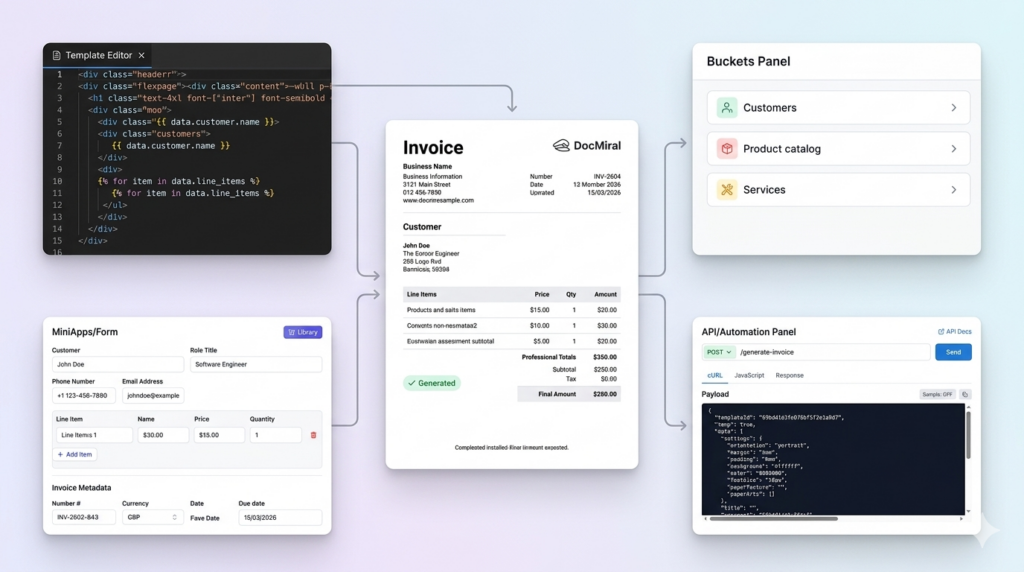
In DocMiral, templates are built using HTML + TailwindCSS with dynamic variables.
2. Data Inputs
Structured data replaces manual typing:
{
  "customer": {
    "name": "John Smith",
    "address": "London, UK"
  },
  "line_items": [
    { "description": "Web Development", "quantity": 10, "price": 50 }
  ]
}
3. Reusable Data Sources
Instead of re-entering:
- Customers
- Products
- Pricing
You store them once and reuse them.
DocMiral uses Buckets for this—shared data stores for things like customer lists or product catalogs.
4. Logic (Totals, Taxes, Formatting)
Automation includes:
- Subtotals
- VAT / tax rules
- Currency formatting
Example:
{{ priceformat(item.quantity * item.price) }}Step-by-Step Example Workflow
Let’s walk through a simple automated invoice flow.
Step 1 — Create a Template
Define the layout:
<h1>Invoice</h1>
<p>{{ data.business.name }}</p>
<p>{{ data.customer.name }}</p>
Step 2 — Add Dynamic Fields
{{ data.invoice_number }}
{{ data.date }}
{{ data.due_date }}
Step 3 — Add Line Item Loop
{% for item in data.line_items %}
  <tr>
    <td>{{ item.description }}</td>
    <td>{{ item.quantity }}</td>
    <td>{{ item.price }}</td>
  </tr>
{% endfor %}
Step 4 — Provide Data
Two approaches:
Manual (UI form)
Fill structured fields like:
- Customer
- Products
- Dates
Programmatic (API)
POST /generate-invoice
{
  "template_id": "invoice_001",
  "data": { ... }
}
Step 5 — Generate Output
The system produces:
- Image
- or other formats
No manual editing required.
Advanced Automation Use Cases
Once the foundation is in place, automation becomes powerful.
1. Generate Invoices via API
Trigger invoice creation:
- After a payment
- After a purchase
- From your backend system
2. Recurring Invoices
Automatically generate:
- Monthly retainers
- Subscription invoices
No human involvement.
3. Use Stored Data
Select:
- Existing customers
- Saved products
instead of typing.
4. AI-Assisted Input
Instead of structured JSON, you can say:
“Create an invoice for John, 5 hours of consulting at £100/hour”
AI fills the fields automatically.
DocMiral’s TARS assistant supports this kind of input and maps it to structured data.
How DocMiral Enables This
DocMiral provides all building blocks in one system:
HTML + Tailwind Templates
You control layout at code level with full flexibility.
MiniApps (Structured Inputs)
Instead of raw JSON, you get UI sections like:
- Business info
- Customer info
- Products
These map directly to template variables.
Buckets (Reusable Data)
Store:
- Customer lists
- Product catalogs
Reuse across documents.
API-Based Generation
Generate invoices programmatically using API tokens:
Authorization: Bearer <token>
TARS AI Assistant
- Fill invoices from natural language
- Extract data from files
- Modify templates
Real Example: Invoice Structure
A typical automated invoice includes:
1. Business Info
{{ data.business.name }}
{{ data.business.address }}
2. Customer Info
{{ data.customer.name }}
{{ data.customer.email }}
3. Line Items
{% for item in data.line_items %}
  {{ item.description }}
  {{ item.quantity }}
  {{ item.price }}
{% endfor %}
4. Totals
Subtotal: {{ data.subtotal }}
VAT: {{ data.tax }}
Total: {{ data.total }}
Each section is fully dynamic—no hardcoded values.
Manual vs Automated Workflow
| Step | Manual | Automated |
|---|---|---|
| Create invoice | Copy & edit | Generate |
| Add data | Type manually | Inject data |
| Calculate totals | Manual | Automatic |
| Format | Inconsistent | Standardized |
| Scale | Difficult | Seamless |
Conclusion
Automatic invoice creation is not just about saving time—it’s about:
- Consistency → every invoice looks correct
- Accuracy → no calculation errors
- Scalability → generate thousands if needed
For developers, it becomes part of your system.
For freelancers, it removes repetitive work.
For businesses, it standardizes operations.
Once you switch from “editing documents” to “generating documents,” invoicing stops being a task—and becomes a process.
Leave a Reply