

Category: Tars AI

  • Agentic AI Document Automation: What Changes in 2026 (And How to Use It)

    Agentic AI Document Automation: What Changes in 2026 (And How to Use It)

    The landscape of document automation is on the cusp of a significant transformation. As we enter 2026, the traditional focus on data extraction is shifting dramatically towards advanced reasoning and agentic workflows. This evolution allows for autonomous, end-to-end document processes that are smarter, more flexible, and far more intuitive.

    From Data Extraction to Agentic Reasoning

    For years, document automation centered on extracting data points from forms, PDFs, or unstructured text—an essential but limited capability. In 2026, the paradigm shifts as multi-layered AI systems replace monolithic tools. These systems not only parse data but understand context, reason through complex instructions, and autonomously execute tasks without manual intervention.

    This agentic approach combines multiple AI components working collaboratively in layers, including chat interfaces, smart template builders, and contextual file parsing with reasoning capabilities. The goal is a seamless, dynamic workflow where users can interact in natural language, and the AI interprets, adapts, and generates documents accordingly.

    DocMiral’s TARS: The Embodiment of Agentic AI

    DocMiral’s TARS is uniquely positioned at the forefront of this transformation. As an agentic AI engine, TARS integrates chat-based template editing and customization, Smart Builder layers for structured design, and advanced file parsing with reasoning to deliver sophisticated document automation workflows.
    Key Use Cases with TARS Agentic Features

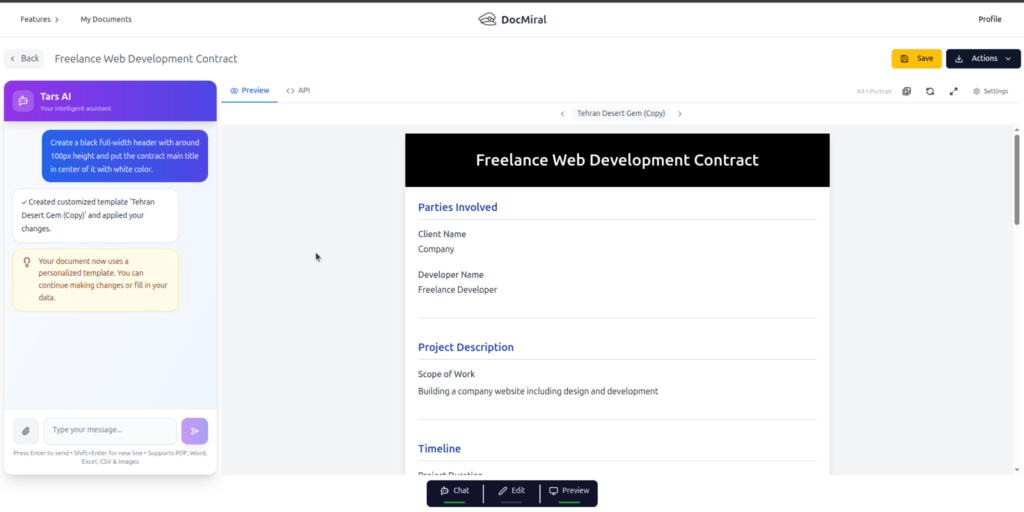
    • Chat to edit design and data: Users can simply instruct TARS, “Make the header dark blue and add skills from this CV,” and the AI applies precise changes without manual coding or template rebuilding.
    • Combining fill and customize intents: TARS understands both the intent to fill data and to customize layout or styling simultaneously, bridging gaps traditional tools can’t handle without complex workflows.
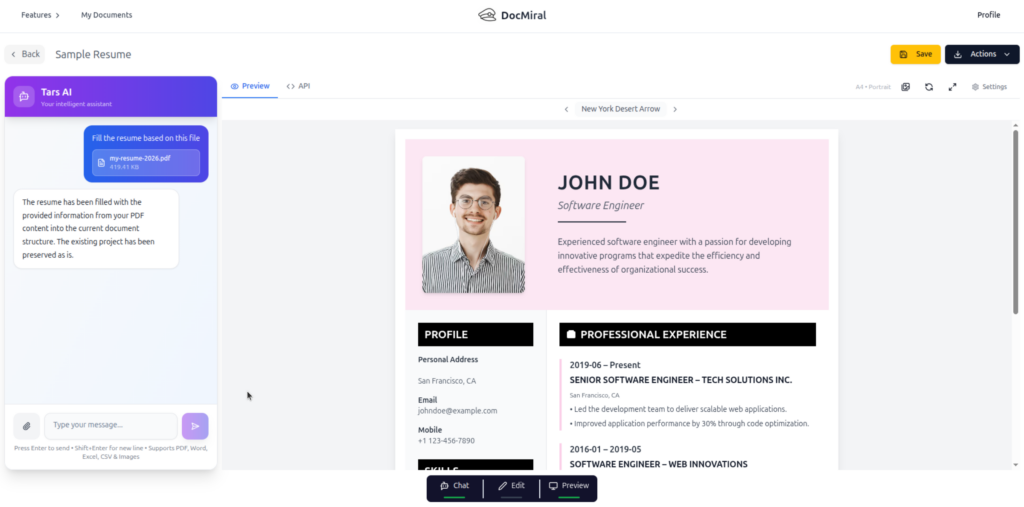
    • Context-aware changes via attachments: By attaching PDFs or images, users provide context for TARS to reason over. For instance, uploading a CV lets TARS extract relevant skills and integrate them into an existing document design dynamically.
    Benefits Over Traditional Automation Tools

    Agentic AI workflows, as embodied by TARS, are revolutionizing document automation with several clear advantages:

    • Surgical patches versus full rewrites: Instead of rebuilding whole templates for minor edits or new data points, TARS applies precise, context-aware patches, saving time and reducing errors.
    • Governance through Buckets: Data libraries called Buckets allow for reusable, governed, and structured inputs that maintain compliance and consistency across automated documents.
    • Natural interaction and reduced complexity: Users interact in simple language instead of complex scripting or template languages, making automation accessible beyond developers and designers.

    Example Scenario: “Make Header Light Blue”

    This typical instruction showcases the agentic power of TARS. The user chats with the AI, attaches a CV PDF, and requests specific styling changes plus data extraction and insertion. TARS parses the CV, extracts skill information, updates the document header’s color, and injects the skills into the appropriate section of the document—all in one seamless workflow.

    Why 2026 is the Pivot Year for Document Automation

    Several converging trends make 2026 a watershed moment:

    • AI models have matured to reliably perform reasoning tasks over complex documents.
    • Hybrid AI architectures combining chat, parsing, and smart builders have become production-ready.
    • User expectations demand more intuitive and autonomous document processes.
    • Organizations face pressure for governance, speed, and customization without increasing operational overhead.

    Agentic AI meets these demands by moving beyond extraction to context-rich, autonomous document generation and management.

    Get Started with Agentic Document Automation Today

    DocMiral invites you to experience the future now by chatting with TARS inside the Entity Builder. Explore how agentic AI can transform your document workflows, reducing complexity, boosting agility, and maintaining full governance.

    Visit the DocMiral platform and begin automating documents with TARS — where 2026’s document automation future is available today.

  • From Prompt to Template: Creating Document Layouts with AI

    Designing document templates has traditionally been a slow, technical process.

    You sketch a layout, write HTML code, define variables, test the data structure, tweak the layout again, export a PDF, and repeat. For many developers and teams, this process can take hours — sometimes days — before a template becomes reusable.

    But what if you could skip most of that process and start with a simple prompt?

    With DocMiral’s Smart AI Builder, you can describe the document you want in plain language, and the system will generate a complete template layout — including fields, structure, and design.

    This article walks through how that works using a real example.


    The Problem: Document Templates Are Harder Than They Look

    When teams need automated documents — invoices, reports, contracts, meeting minutes — they usually face two challenges:

    1. Designing a professional layout
    2. Defining the dynamic data structure

    A document template isn’t just static HTML. It needs:

    • dynamic fields
    • lists and tables
    • reusable structure
    • consistent layout
    • PDF-friendly formatting

    For example, a board meeting minutes document might include:

    • meeting metadata
    • attendees and absentees
    • agenda items
    • discussion notes
    • action items

    Each of those pieces needs its own structure.

    Traditionally, developers had to build this manually.

    DocMiral approaches this differently.


    The Idea: Describe the Document Instead of Coding It

    With the Smart Builder, you simply describe the document you want.

    For example:

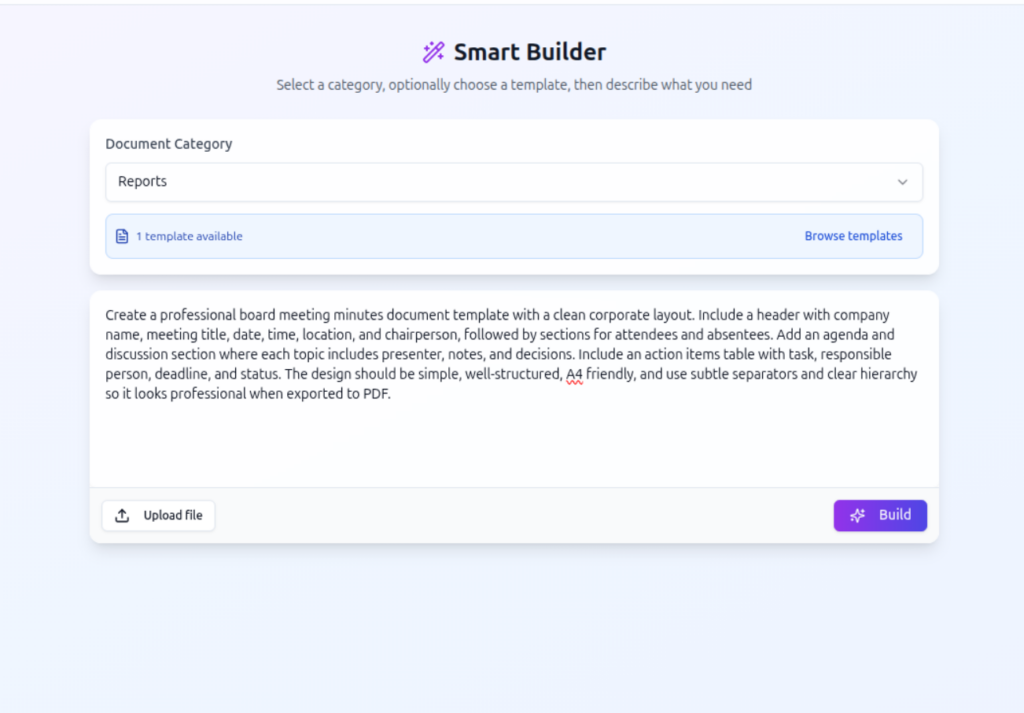
    “Create a professional board meeting minutes document template with a clean corporate layout. Include a header with company name, meeting title, date, time, location, and chairperson, followed by sections for attendees and absentees. Add an agenda and discussion section where each topic includes presenter, notes, and decisions. Include an action items table with task, responsible person, deadline, and status. The design should be simple, well-structured, A4 friendly, and use subtle separators and clear hierarchy so it looks professional when exported to PDF.”

    This single prompt contains everything the system needs to generate the template.


    Step 1 — Writing the Prompt

    In the Smart Builder interface, the user first selects a document category and then describes the document they want.

    template-create-by-ai-step1-get-prompt

    The description doesn’t need to be technical. It just needs to explain:

    • what sections the document has
    • what information each section contains
    • the overall style or layout

    For example:

    • professional
    • minimal
    • A4 friendly
    • clear hierarchy
    • corporate style

    These cues help the AI understand how to design the template.


    Step 2 — Understanding the Request

    Once the prompt is submitted, DocMiral first determines what the user wants to do.

    Is the user:

    • creating a template
    • filling a template
    • customizing an existing template
    • doing both creation and filling?
    template-create-by-ai-step-prompt-intent-resolver

    In this case, the system detects:

    Create Template

    That means it will design a new template from scratch based on the description.

    This is part of DocMiral’s AI pipeline that interprets user intent before any generation begins.


    Step 3 — Planning the Template Structure

    After understanding the request, the system analyzes the prompt and extracts the document structure.

    For our meeting minutes example, the AI identifies fields such as:

    • company name
    • meeting title
    • date and time
    • meeting location
    • chairperson
    • attendees
    • absentees
    • agenda items
    • discussion notes
    • action items
    template-create-by-ai-step-panningtemplate

    The system also decides what kind of structure each field should use.

    For example:

    SectionData Structure
    AttendeesList
    Agenda topicsList
    Discussion notesList
    Action itemsTable

    This step transforms a natural language description into a structured template schema.


    Step 4 — Generating the Template Fields

    Next, the system generates the variables that will appear in the template.

    For example:

    • header fields
    • lists of agenda topics
    • tables for action items
    • metadata fields for meeting details
    template-create-by-ai-step-define-template-fields

    DocMiral templates support multiple variable types including:

    • structured MiniApp data
    • typed input fields
    • flexible Jinja2 variables

    These variables allow documents to adapt to different data while keeping the layout consistent.

    Want to know more about DocMiral variables system?


    Step 5 — Generating the Document Layout

    After defining the data structure, the AI generates the actual document layout.

    The layout is created using:

    • HTML
    • TailwindCSS
    • DocMiral template variables

    The design follows the constraints described in the prompt:

    • A4 page format
    • clear hierarchy
    • subtle separators
    • professional corporate layout

    The result is a ready-to-use template.


    The Result: A Fully Functional Template

    Once the pipeline finishes, DocMiral produces a working document template that can immediately be used to generate documents.

    You can then open it in the document editor, fill the fields, and export the final document.

    When the template is opened in the editor, users can:

    • fill fields using structured forms
    • preview the document in real time
    • export to PDF
    • modify the design with AI

    Why This Workflow Matters

    The Smart Builder workflow changes how templates are created.

    Instead of designing first and structuring data later, the system does both simultaneously.

    That means users can move from:

    idea → working template

    in seconds.

    This approach is especially useful for:

    Developers

    who want to quickly create document generation templates for their applications.

    Startups

    who need invoices, reports, or contracts without building complex template systems.

    Teams

    who regularly generate structured documents like meeting notes or reports.


    A Real Example: Meeting Minutes

    Using the earlier prompt, DocMiral automatically creates a document with:

    • a clean header for meeting metadata
    • attendee and absentee lists
    • structured agenda sections
    • discussion notes
    • a table for action items

    The layout is already optimized for PDF export, which means it prints cleanly on A4 pages without manual adjustments.


    Learn More About the Smart Builder

    If you’d like to explore the feature in detail, see the official guide:

    Using the Smart AI Builder
    https://docmiral.com/features/templates/create-pdf/using-smart-ai-builder

    The guide explains how the system turns prompts into templates and how to use the builder effectively.


    Conclusion

    AI is changing how documents are created.

    Instead of spending hours designing templates and defining fields manually, you can now describe what you want and let the system generate the structure for you.

    DocMiral’s Smart Builder bridges the gap between natural language and document automation — allowing anyone to turn an idea into a working document template.

    And as templates become easier to create, document workflows become easier to automate.

