
Category: Buckets

  • Reusable Data Buckets: Never Re-Type Customer Info Again in 2026

    The Cost of Repetitive Data Entry in Document Workflows

    Anyone who has dealt with generating documents such as invoices, contracts, or reports understands the frustration of repeatedly typing the same customer or product information over and over. This repetitive data entry is not just tedious; it is a significant source of errors and wasted time. Professionals often spend hours re-entering details that should be readily accessible, slowing down the entire document creation process.

    How Reusable Data Buckets Revolutionize Document Creation in 2026

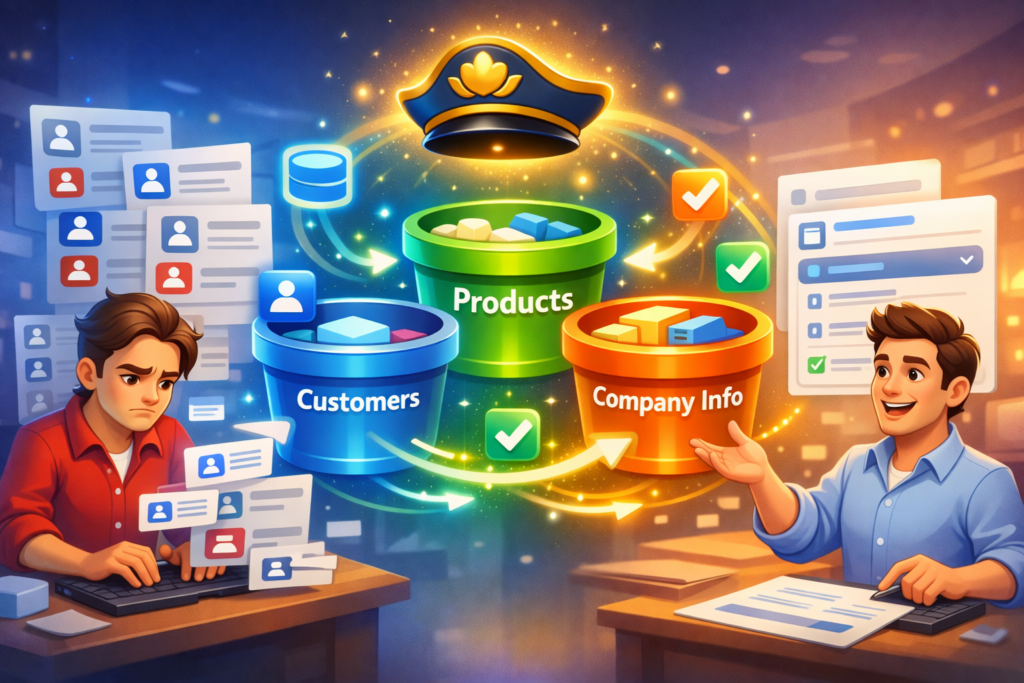
    The year 2026 brings solutions that leverage agentic and reusable data systems to eliminate this redundancy. At the forefront of this innovation is DocMiral’s Buckets. These are named, reusable data stores that hold essential information—such as customers, products, and company details—that can be accessed across templates and document types.

    Introducing DocMiral Buckets: Your Data, Smarter and Always Ready

    DocMiral Buckets enable template creators and document users to store structured data separately from templates. This means once a customer’s information is stored in a bucket, it can be auto-filled into any document template without repeatedly typing or manual lookups.
    Creating Named Data Stores

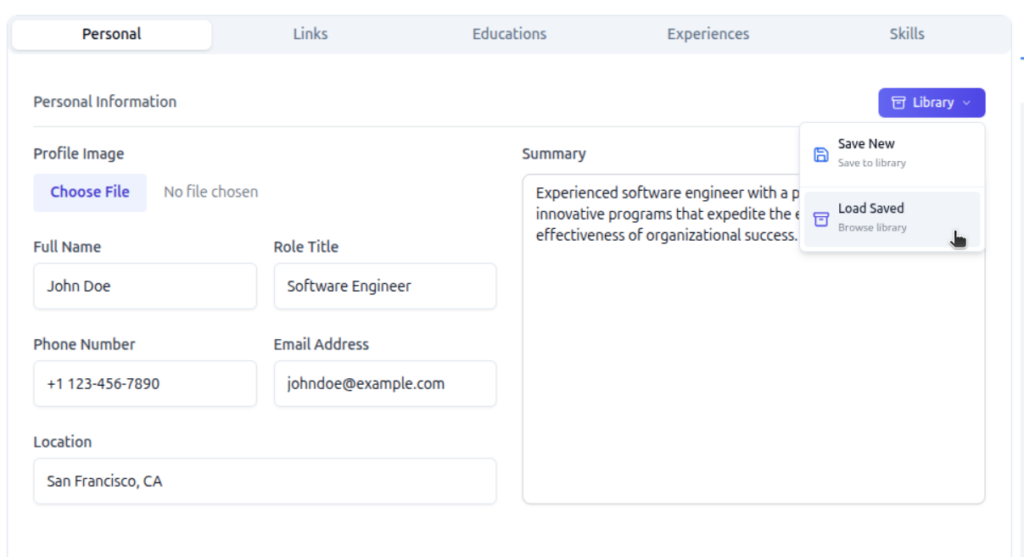
    Buckets are organized by types such as customers, products, and company info. You can create and manage these buckets from your profile or on each section in document builder (library button), defining the fields relevant to each data set such as name, address, contact details for customers, or SKU, price for products.

    Autocomplete and Intelligent Lookup in Document Forms

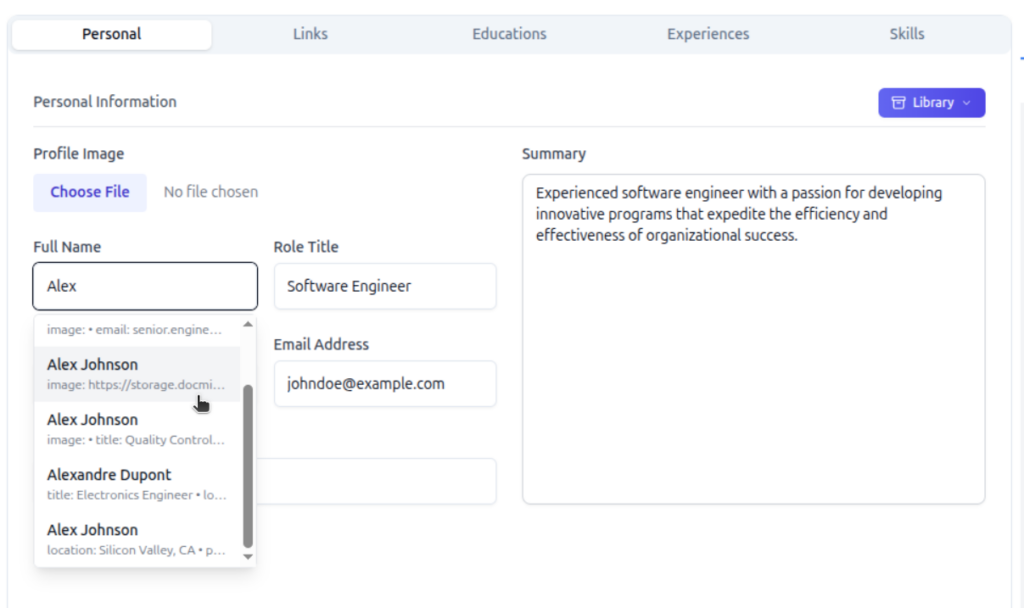
    When filling in a document, DocMiral’s form UI offers intelligent autocomplete suggestions from these buckets. Start typing a customer name, and the system suggests matches, populated with all corresponding information fetched automatically. This is powered by TARS AI lookup integration, which intelligently retrieves and populates fields based on context.
    Saving Document Data Back to Buckets

    As you generate documents, any new or updated customer or product data entered can be saved back to the appropriate bucket. This creates a continuous feedback loop ensuring your reusable data buckets stay current and synchronized with your workflow.

    Workflow in Action: Build Once, Reuse Everywhere

    Imagine building an invoice for your customer once and saving that customer’s data in a bucket. The next time you create any document involving that customer, all information auto-fills instantly, eliminating repetitive input.

    This streamlined approach can save you 15+ hours per week in document generation alone, freeing time for higher-value work and reducing error risks.

    Getting Started: Create Your First Bucket Today

    Ready to stop re-typing customer info and embrace the future of document automation? Define your data fields, add your entries, and watch the magic of seamless reuse across templates and workflows.

    Say goodbye to repetitive typing, and hello to smarter document workflows in 2026.
    Create Invoice In 1-Minute
  • How to Create Professional Invoices Automatically

    create-an-invoice-template

    Introduction (Hook)

    If you’ve ever sent invoices regularly—whether as a freelancer, developer, or small business owner—you’ve probably repeated the same steps dozens (or hundreds) of times:

    • Copy an old invoice
    • Update client details
    • Adjust line items
    • Recalculate totals
    • Export to PDF
    • Send it

    It works… until it doesn’t.

    You start noticing small mistakes: wrong totals, outdated addresses, inconsistent formatting. And as your volume grows, this “simple task” becomes a bottleneck.

    This is exactly where automatic invoice creation becomes essential—not as a convenience, but as infrastructure.


    The Problem with Manual Invoicing

    Manual invoicing breaks down quickly as complexity increases.

    1. Repetitive Data Entry

    You repeatedly type:

    • Customer name and address
    • Product or service details
    • Pricing and quantities

    This is not just tedious—it’s error-prone.

    2. Calculation Mistakes

    Even small errors in:

    • Tax calculations
    • Discounts
    • Totals

    can create trust issues or require reissuing invoices.

    3. Inconsistent Formatting

    Over time, invoices diverge:

    • Different layouts
    • Missing fields
    • Misaligned branding

    This reduces professionalism.

    4. No Scalability

    Creating 2 invoices manually is fine.
    Creating 200 per month is not.


    What “Automatic Invoice Creation” Really Means

    Automatic invoicing is not about “auto-filling a PDF.”

    It’s about template-based document generation.

    Core Idea

    You define a template once, and then generate invoices by injecting data.

    Instead of:

    Editing documents manually

    You:

    Generate documents from structured data

    Example Concept

    <h1>Invoice #{{ data.invoice_number }}</h1>
    <p>Customer: {{ data.customer.name }}</p>{% for item in data.line_items %}
    <div>
    {{ item.description }} — {{ item.quantity }} × {{ item.price }}
    </div>
    {% endfor %}

    Here:

    • {{ data.customer.name }} is dynamic
    • {% for item in data.line_items %} handles multiple products

    This is the foundation of automation.


    Core Components of an Automated Invoice System

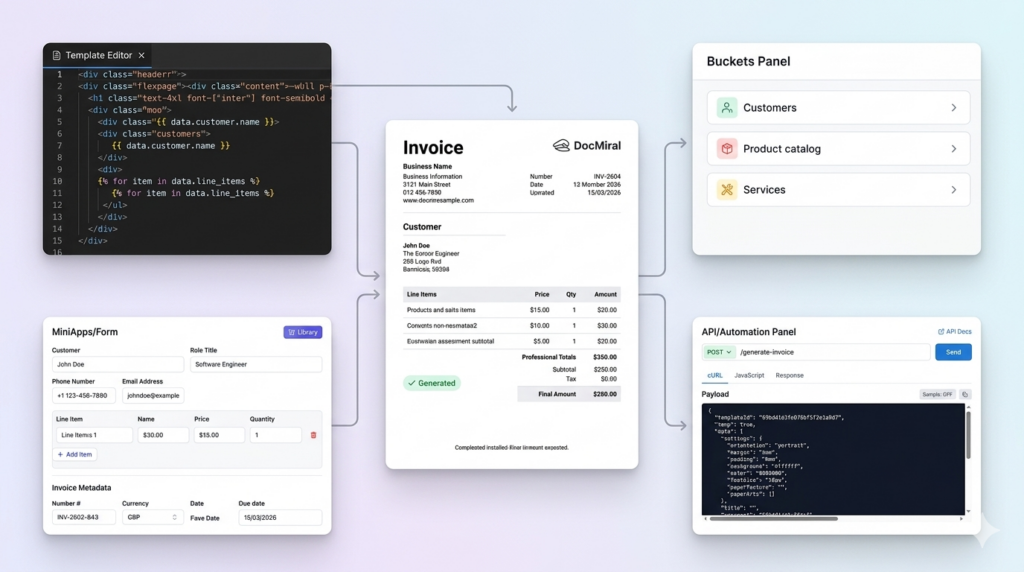
    To automate invoices properly, you need four key parts:

    1. Templates (HTML + Styling)

    A structured layout that defines:

    • Header (logo, business info)
    • Customer section
    • Line items table
    • Totals and taxes

    In DocMiral, templates are built using HTML + TailwindCSS with dynamic variables.


    2. Data Inputs

    Structured data replaces manual typing:

    {
    "customer": {
    "name": "John Smith",
    "address": "London, UK"
    },
    "line_items": [
    { "description": "Web Development", "quantity": 10, "price": 50 }
    ]
    }

    3. Reusable Data Sources

    Instead of re-entering:

    • Customers
    • Products
    • Pricing

    You store them once and reuse them.

    DocMiral uses Buckets for this—shared data stores for things like customer lists or product catalogs.


    4. Logic (Totals, Taxes, Formatting)

    Automation includes:

    • Subtotals
    • VAT / tax rules
    • Currency formatting

    Example:

    {{ priceformat(item.quantity * item.price) }}

    Step-by-Step Example Workflow

    Let’s walk through a simple automated invoice flow.

    Step 1 — Create a Template

    Define the layout:

    <h1>Invoice</h1>
    <p>{{ data.business.name }}</p>
    <p>{{ data.customer.name }}</p>

    Step 2 — Add Dynamic Fields

    {{ data.invoice_number }}
    {{ data.date }}
    {{ data.due_date }}

    Step 3 — Add Line Item Loop

    {% for item in data.line_items %}
    <tr>
    <td>{{ item.description }}</td>
    <td>{{ item.quantity }}</td>
    <td>{{ item.price }}</td>
    </tr>
    {% endfor %}

    Step 4 — Provide Data

    Two approaches:

    Manual (UI form)

    Fill structured fields like:

    • Customer
    • Products
    • Dates

    Programmatic (API)

    POST /generate-invoice
    {
    "template_id": "invoice_001",
    "data": { ... }
    }

    Step 5 — Generate Output

    The system produces:

    • PDF
    • Image
    • or other formats

    No manual editing required.


    Advanced Automation Use Cases

    Once the foundation is in place, automation becomes powerful.

    1. Generate Invoices via API

    Trigger invoice creation:

    • After a payment
    • After a purchase
    • From your backend system

    2. Recurring Invoices

    Automatically generate:

    • Monthly retainers
    • Subscription invoices

    No human involvement.


    3. Use Stored Data

    Select:

    • Existing customers
    • Saved products

    instead of typing.


    4. AI-Assisted Input

    Instead of structured JSON, you can say:

    “Create an invoice for John, 5 hours of consulting at £100/hour”

    AI fills the fields automatically.

    DocMiral’s TARS assistant supports this kind of input and maps it to structured data.


    How DocMiral Enables This

    DocMiral provides all building blocks in one system:

    HTML + Tailwind Templates

    You control layout at code level with full flexibility.


    MiniApps (Structured Inputs)

    Instead of raw JSON, you get UI sections like:

    • Business info
    • Customer info
    • Products

    These map directly to template variables.


    Buckets (Reusable Data)

    Store:

    • Customer lists
    • Product catalogs

    Reuse across documents.


    API-Based Generation

    Generate invoices programmatically using API tokens:

    Authorization: Bearer <token>

    TARS AI Assistant

    • Fill invoices from natural language
    • Extract data from files
    • Modify templates

    Real Example: Invoice Structure

    A typical automated invoice includes:

    1. Business Info

    {{ data.business.name }}
    {{ data.business.address }}

    2. Customer Info

    {{ data.customer.name }}
    {{ data.customer.email }}

    3. Line Items

    {% for item in data.line_items %}
    {{ item.description }}
    {{ item.quantity }}
    {{ item.price }}
    {% endfor %}

    4. Totals

    Subtotal: {{ data.subtotal }}
    VAT: {{ data.tax }}
    Total: {{ data.total }}

    Each section is fully dynamic—no hardcoded values.


    Manual vs Automated Workflow

    StepManualAutomated
    Create invoiceCopy & editGenerate
    Add dataType manuallyInject data
    Calculate totalsManualAutomatic
    FormatInconsistentStandardized
    ScaleDifficultSeamless

    Conclusion

    Automatic invoice creation is not just about saving time—it’s about:

    • Consistency → every invoice looks correct
    • Accuracy → no calculation errors
    • Scalability → generate thousands if needed

    For developers, it becomes part of your system.
    For freelancers, it removes repetitive work.
    For businesses, it standardizes operations.

    Once you switch from “editing documents” to “generating documents,” invoicing stops being a task—and becomes a process.